


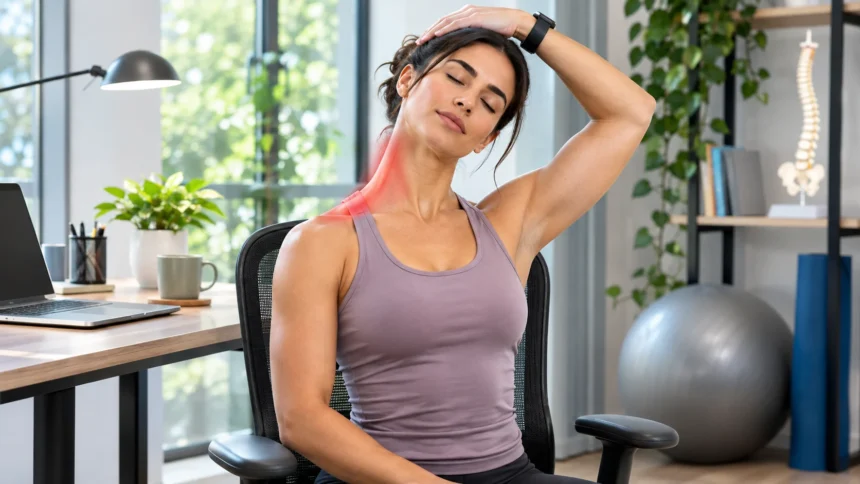
Spending hours looking at smartphones, computers, and tablets can leave your neck feeling stiff, tired, or uncomfortable. This common problem is often called tech neck, and it can affect people who spend long periods using digital devices. Fortunately, simple tech neck exercises may help improve mobility, reduce muscle tension, and make everyday movements more comfortable. Learning proper techniques and developing healthy screen habits can support better neck comfort over time.
Tech neck is not always caused by poor posture alone. Stress, limited movement, workstation setup, and existing muscle or joint problems may also contribute to discomfort. Gentle stretching, strengthening exercises, and regular movement breaks can help address some of these factors. This guide explains practical exercises, their benefits, common mistakes, and useful tips for managing screen-related neck discomfort.
What Is Tech Neck and Why Does It Happen?
Tech neck is an informal term used to describe neck discomfort associated with prolonged use of digital devices. It often occurs when someone spends extended periods looking downward at a smartphone or working in one position. The neck muscles may become tired from maintaining a fixed position. However, not everyone who looks down at a device develops neck pain.
The neck supports the head while allowing movement in several directions. Remaining in one position for a long time can contribute to muscle fatigue and stiffness. Looking downward may increase the effort required from some neck muscles, particularly during prolonged activities. Individual strength, movement habits, stress, and previous injuries can also influence how the neck responds.
Tech neck symptoms may include stiffness, soreness, limited movement, and discomfort around the upper shoulders. Some people also experience tension-type headaches or discomfort around the shoulder blades. These symptoms have several possible causes, so they should not automatically be blamed on screen use. Persistent or worsening symptoms deserve assessment by a qualified healthcare professional.
What Are the Benefits of Tech Neck Exercises?
Tech neck exercises may help improve the flexibility and movement of muscles surrounding the neck and upper back. Gentle movements encourage the neck to move through a comfortable range rather than remaining still for extended periods. Regular practice may also reduce feelings of stiffness. These improvements can make routine activities such as turning your head or looking around more comfortable.
Another potential benefit is better muscular endurance and movement control. Strengthening the muscles that support the neck and shoulder blades may help them tolerate everyday physical demands. Exercises can also encourage greater awareness of comfortable sitting and standing positions. However, no single exercise can guarantee that neck pain will disappear or prevent future discomfort.
Regular movement may also provide a useful break from prolonged screen activities. Short exercise sessions can interrupt periods of inactivity and encourage relaxation of tense muscles. Combined with a comfortable workstation and varied sitting positions, these habits may improve overall comfort. The greatest benefits generally come from gentle, consistent activity rather than forcing the neck into extreme positions.
Chin Tucks for Neck Alignment and Muscle Control
Chin tucks are among the most commonly recommended exercises for neck movement control. They involve gently moving the head backward without tilting it upward or downward. Start by sitting or standing in a comfortable position with your shoulders relaxed. Keep your eyes facing forward and avoid lifting your chin toward the ceiling.
Slowly draw your chin straight backward, as though making a small double chin. Keep the movement gentle and avoid pressing your head into an uncomfortable position. Hold briefly before returning to your normal resting position. You can begin with a few comfortable repetitions, focusing on smooth movement rather than trying to achieve a large range.
Chin tucks can help practice controlled neck retraction and engage muscles involved in supporting the head. Some people find them useful after long periods of computer work. However, they should not be performed aggressively or treated as a way to force perfect posture. Stop if the movement causes dizziness, sharp pain, or symptoms spreading into the arms.
Neck Side Stretches for Muscle Tightness
Neck side stretches can gently target muscles along the sides of the neck. These muscles may feel tight after prolonged sitting or maintaining the same head position. Begin by sitting upright in a comfortable chair with your shoulders relaxed. Keep your head facing forward and avoid rotating it while preparing for the stretch.
Slowly tilt your head toward one shoulder until you feel a mild stretch along the opposite side of your neck. Keep both shoulders relaxed rather than lifting one toward your ear. Hold the position for around 10 to 20 seconds if comfortable. Return to the center and repeat gently on the opposite side without forcing additional movement.
This exercise may improve comfort when the side neck muscles feel stiff or restricted. However, stretching should create only a mild sensation rather than pain or pressure. Avoid pulling strongly on your head with your hands. If you have ongoing neck symptoms or a previous injury, seek professional advice before attempting movements that cause discomfort.
Upper Trapezius Stretches for Shoulder Tension
The upper trapezius is a muscle that extends between the neck, shoulders, and upper back. It helps control shoulder blade movement and supports several everyday activities. People who spend long periods working at computers sometimes notice tension in this region. Gentle stretching may provide temporary relief from feelings of tightness.
Sit comfortably with your shoulders relaxed and your hands resting naturally. Tilt your head slightly toward one shoulder while keeping your gaze mostly forward. You may feel a gentle stretch along the opposite upper shoulder and neck. Hold briefly without pulling forcefully, then return to the starting position and repeat on the other side.
Upper trapezius stretches can be included in short movement breaks during desk work. They may feel especially helpful when combined with walking or changing sitting positions. However, muscle tightness does not always mean a muscle needs more stretching. Strengthening exercises, appropriate rest, and addressing repetitive work demands can also support long-term comfort.
Levator Scapulae Stretch for Neck and Shoulder Mobility
The levator scapulae is a muscle connecting the upper neck to the shoulder blade. It assists with shoulder blade movement and contributes to certain neck movements. Stiffness around this area may occur after prolonged desk work or other repetitive activities. A gentle levator scapulae stretch can help explore comfortable movement around the upper shoulder.
Begin by sitting upright with both shoulders relaxed. Turn your head slightly toward one side and gently lower your gaze toward the front of your shoulder. Move only until you notice a mild stretch around the back or side of your neck. Hold comfortably before returning to the center and repeating on the opposite side.
Avoid forcing your chin downward or pulling on the back of your head. Excessive pressure can make an otherwise gentle movement uncomfortable. This stretch is most useful when it feels comfortable and does not increase existing symptoms. Pairing it with upper-back movement and shoulder exercises may provide a more balanced approach to managing everyday neck tension.
Shoulder Rolls for Tech Neck Relief
Shoulder rolls are simple movements that can be performed during short breaks from digital devices. They encourage movement around the shoulders and upper back without requiring special equipment. Begin by sitting or standing in a relaxed position. Allow your arms to rest naturally and avoid holding unnecessary tension in your hands or shoulders.
Slowly raise your shoulders slightly, move them backward, and lower them in a smooth circular motion. Repeat several times at a comfortable pace before changing direction. Keep the movement controlled rather than creating large or forceful circles. Continue breathing normally and avoid tightening your neck while moving your shoulders.
Shoulder rolls may help interrupt prolonged stillness and encourage awareness of upper-body tension. They can be useful between work tasks or after extended periods of reading. However, they do not directly correct every cause of neck discomfort. Combining them with regular walking, gentle neck movement, and suitable strengthening exercises can support a more complete routine.
Seated Neck Rotation Exercises for Better Mobility
Neck rotations help maintain the ability to turn your head comfortably from side to side. This movement is important for everyday activities, including looking around a room and checking your surroundings. Begin by sitting upright with your shoulders relaxed. Keep your head level and avoid leaning backward or lifting your chin.
Slowly turn your head toward one side until you reach a comfortable stopping point. Pause briefly before returning to the center. Repeat the movement toward the opposite side while keeping your shoulders mostly still. Use a smooth pace and avoid trying to push beyond your normal range of motion.
Gentle neck rotations may help reduce feelings of stiffness associated with prolonged inactivity. They also encourage controlled movement without requiring resistance equipment. However, the exercise should not produce dizziness, sharp pain, or unusual sensations. If turning your head causes significant discomfort, avoid forcing the movement and consider seeking advice from a healthcare professional.
Shoulder Blade Squeezes for Upper-Back Strength
Shoulder blade squeezes are commonly used to practice control of the muscles around the upper back. These muscles contribute to shoulder stability and coordinated arm movement. Begin by sitting or standing comfortably with your arms relaxed. Keep your neck in a natural position rather than lifting your chin or holding your body rigidly.
Gently move your shoulder blades toward each other, as though bringing them slightly closer together. Avoid pulling your shoulders downward with excessive force or arching your lower back. Hold the position briefly before relaxing completely. Repeat several times while maintaining comfortable breathing and a smooth movement pattern.
This exercise can help improve awareness of the muscles supporting the shoulder blades. It may also provide a useful movement break during computer work. However, maintaining tightly squeezed shoulder blades throughout the day is unnecessary and may create additional fatigue. A comfortable posture should allow natural movement rather than constant muscular tension.
Wall Angels for Shoulder and Upper-Back Mobility
Wall angels are a controlled movement that involves the shoulders, upper back, and arms. They can help explore overhead mobility while encouraging coordination around the shoulder blades. Begin by standing near a wall with your feet comfortably positioned. Keep your head and back in a natural position without forcing every part of your body against the surface.
Raise your arms into a comfortable bent-elbow position, similar to a goalpost shape. Slowly move your arms upward and downward while staying within a pain-free range. Your hands or elbows do not need to remain in contact with the wall throughout the movement. Avoid arching your lower back to lift your arms higher.
Wall angels may help improve shoulder movement awareness after long periods of sitting. However, they can feel challenging for people with restricted shoulder mobility. Reduce the movement range or try the exercise away from the wall if necessary. The goal is smooth, comfortable motion rather than achieving a particular position through force.
Thoracic Extension Exercises for Upper-Back Mobility
The thoracic spine forms the middle and upper portion of the back. Its mobility contributes to many movements involving the shoulders, arms, and trunk. Prolonged sitting may make this region feel stiff, particularly when movement opportunities are limited. Gentle thoracic extension exercises can provide a useful alternative to focusing exclusively on the neck.
Sit in a stable chair with a backrest that supports your mid-back. Place your hands comfortably across your chest or behind your head without pulling your neck. Gently lean your upper back backward over the chair support while keeping the movement small. Return to an upright position and repeat only within a comfortable range.
Thoracic extension movements may help relieve feelings of upper-back stiffness and encourage movement variety. They can also complement shoulder mobility exercises in a general fitness routine. Avoid forcing the spine into a large backward bend or placing excessive pressure on your neck. People with spinal injuries or persistent pain should seek individualized guidance before attempting unfamiliar movements.
Doorway Chest Stretches for Desk Workers
Doorway chest stretches target muscles across the front of the chest and shoulders. These muscles contribute to many pushing and reaching activities. Long periods of computer work may leave some people feeling tight across the chest. A gentle stretch can provide a comfortable change from repeated forward-reaching tasks.
Stand near a doorway and place one forearm against the doorframe at a comfortable height. Keep your elbow slightly below or near shoulder level, depending on what feels natural. Slowly turn your body away until you feel a mild stretch across the front of your chest. Hold briefly before releasing and repeating on the opposite side.
This stretch should not cause tingling, numbness, or sharp shoulder discomfort. Avoid placing your arm too high if that position feels restrictive. Chest stretching can complement upper-back strengthening exercises, but it is not a guaranteed solution for neck pain. A balanced approach usually includes varied movement, appropriate strength training, and comfortable daily work habits.
Deep Neck Flexor Exercises for Neck Support
The deep neck flexors are muscles located toward the front of the cervical spine. They contribute to head movement and control, particularly during gentle nodding actions. Some rehabilitation programs include exercises targeting these muscles. However, the appropriate exercise depends on individual symptoms, strength, and movement tolerance.
A gentle starting movement can be performed while lying on your back with your head supported. Keep your neck relaxed and make a small nod, similar to quietly indicating yes. Avoid lifting your head from the surface or pressing your chin forcefully downward. Return to the starting position after a brief, comfortable hold.
Deep neck flexor exercises focus on controlled movement rather than lifting heavy resistance. Their purpose is to practice gentle muscular activation and coordination. People receiving treatment for persistent neck pain may benefit from individualized guidance on technique and progression. If the movement produces discomfort or headaches, stop and consult a qualified healthcare professional.
How Often Should You Perform Tech Neck Exercises?
The ideal frequency of tech neck exercises depends on your symptoms, daily activities, and exercise tolerance. Gentle mobility movements can often be included in short breaks during the day. However, there is no universal schedule that works for everyone. Begin with a manageable routine and observe how your neck responds afterward.
For example, you might practice a few comfortable neck movements and shoulder rolls after a prolonged study or work session. More demanding strengthening exercises may require additional recovery between sessions. Start with a small number of repetitions rather than completing a lengthy routine immediately. Gradually increase activity only when movements remain comfortable and do not worsen symptoms.
Regular practice is generally more practical than performing intense stretching occasionally. Short movement breaks can also encourage walking, changing positions, and resting your eyes from the screen. Avoid turning exercise into another source of strain by constantly repeating movements. A balanced schedule should support normal daily activity while allowing appropriate recovery.
How to Maintain Comfortable Posture While Using Devices
Comfortable posture involves more than holding the neck perfectly straight at all times. The body naturally moves through different positions during reading, working, and relaxing. Problems may develop when a position becomes uncomfortable or is maintained for too long. Changing positions regularly can be more useful than trying to remain completely still.
When using a computer, position the screen where you can view it comfortably without repeatedly straining your neck. Keep your keyboard and mouse within easy reach and use a chair that supports relaxed sitting. Your feet should have stable support when possible. Adjust the setup to suit your body and work rather than forcing yourself into an unnatural posture.
Smartphone use can also become more comfortable with simple changes. Bring the device closer to a comfortable viewing height when practical and support your arms if needed. Alternate between sitting, standing, and walking breaks during long sessions. These adjustments do not eliminate every cause of neck pain, but they may reduce unnecessary discomfort during everyday screen use.
Common Mistakes to Avoid During Tech Neck Exercises
One common mistake is stretching the neck too forcefully in an attempt to remove stiffness immediately. Strong pulling or aggressive movements may aggravate sensitive muscles and joints. Gentle stretching should feel comfortable and controlled rather than painful. Avoid assuming that a deeper stretch will automatically produce better results.
Another mistake is concentrating only on neck exercises while ignoring surrounding muscle groups. The shoulders, upper back, and trunk contribute to everyday movement and physical comfort. A balanced routine can include suitable strengthening and mobility exercises for these areas. Focusing exclusively on one tight muscle may overlook other factors contributing to discomfort.
Ignoring persistent symptoms is another important mistake. Neck discomfort that continues, worsens, or frequently interrupts daily activities should receive professional attention. Seek urgent medical assessment if neck pain follows a significant injury or occurs with new weakness, severe headache, or concerning neurological symptoms. Exercises are helpful for some conditions, but they should not replace appropriate medical evaluation.
Tips to Prevent Tech Neck During Daily Screen Use
Regular movement breaks are one of the simplest ways to manage discomfort during long screen sessions. Stand, walk briefly, or change your sitting position when you notice stiffness developing. You do not need an elaborate stretching routine every time you take a break. Even ordinary movement can provide a useful interruption to prolonged inactivity.
Another helpful strategy is adjusting your work environment to reduce unnecessary strain. Keep frequently used items within comfortable reach and position screens according to your viewing needs. Consider using a separate keyboard or monitor when working on a laptop for extended periods. Small changes can make daily tasks more comfortable without requiring expensive equipment.
General physical activity also supports musculoskeletal health and may help improve tolerance for everyday demands. Walking, comfortable strength exercises, and varied recreational activities all provide opportunities to move. Adequate sleep and stress management can also influence how people experience muscle tension. A sustainable routine is usually more practical than relying on one exercise to solve every neck problem.
When Should You Seek Professional Help for Tech Neck?
Mild neck stiffness sometimes improves with movement, activity adjustments, and time. However, symptoms that persist or interfere with sleep, school, work, or normal activities deserve medical evaluation. A healthcare professional can assess possible causes and recommend suitable treatment. This is particularly important when discomfort repeatedly returns despite reasonable changes to daily habits.
Some symptoms require more urgent attention. New arm weakness, significant numbness, difficulty walking, or severe neck pain after an injury should not be managed through exercises alone. Neck stiffness accompanied by fever and a severe headache also requires prompt medical assessment. These symptoms may indicate a condition that needs evaluation beyond routine muscle discomfort.
A physical therapist may recommend individualized exercises based on your symptoms and movement abilities. Treatment may include strengthening, mobility work, activity adjustments, and education about managing discomfort. The goal is to help you return to comfortable movement safely. Professional guidance is especially useful when generic exercises repeatedly increase pain or fail to address ongoing limitations.
Conclusion
Tech neck exercises can be a useful part of managing stiffness and discomfort associated with prolonged screen use. Gentle chin tucks, neck rotations, shoulder movements, and upper-back exercises provide different ways to encourage comfortable movement. Each exercise should be performed slowly and within a pain-free range. The goal is to support neck mobility and muscular control rather than force the body into a particular posture.
Consistent movement habits and a comfortable workstation are also important. Taking regular breaks, adjusting screen positions, and strengthening surrounding muscles may help reduce unnecessary strain. Remember that neck pain can have several causes and does not always result from looking downward. Combining practical daily adjustments with suitable exercise offers a more balanced approach to long-term comfort.
Start with simple exercises that feel comfortable and gradually explore additional movements when appropriate. Avoid aggressive stretching, excessive repetitions, or continuing through pain. If symptoms persist or become more severe, seek professional medical guidance. With a thoughtful routine and greater movement variety, you can develop healthier screen habits and support everyday neck comfort.
Frequently Asked Questions
What are the best exercises for tech neck?
Gentle chin tucks, neck rotations, upper trapezius stretches, shoulder rolls, and shoulder blade exercises may help improve movement and comfort. The most suitable exercises depend on your symptoms and individual mobility.
Can tech neck exercises improve posture?
Tech neck exercises may improve muscular control, mobility, and awareness of comfortable positions. However, posture naturally varies throughout the day, and exercises should not be used to force the neck into one rigid position.
How long does it take to improve tech neck?
Improvement depends on the cause, severity, and duration of symptoms. Some people notice relief with movement and activity changes, while persistent discomfort may require professional assessment and a longer rehabilitation plan.
Can I do tech neck exercises every day?
Gentle, comfortable mobility exercises can often be performed daily. Strengthening activities may require more recovery. Stop movements that worsen symptoms and adjust your routine according to your comfort and professional guidance.
Does looking down at your phone always cause tech neck?
No, looking down at a phone does not automatically cause neck pain. Prolonged stillness, individual physical factors, stress, and existing conditions may contribute. Changing positions regularly can help support comfort.